Traveling across North America for the World Cup 2026 requires a reliable mobile data plan to manage your trip effectively. A global eSIM can provide stable mobile connectivity to access your digital match tickets and navigate between different host cities. This post can help you calculate how much data you need for your entire trip.

How Much Data Do You Need for the World Cup 2026 Trip?
The amount of mobile data needed depends on travel habits and the length of the stay in North America. For most activities, data consumption ranges between 5 MB and 800 MB per hour. Generally, 3 GB to 5 GB of data per week is sufficient for navigation, social media, and digital tickets.
Activity | Data Usage per Hour | Estimated Data per Week |
|---|---|---|
Digital Tickets and Entrance | 1 MB – 5 MB per use | 50 MB – 100 MB |
Online Maps and Navigation | 5 MB – 20 MB | 500 MB – 1 GB |
Social Media Usage | 150 MB – 300 MB | 1.5 GB – 2.5 GB |
General Web Browsing | 20 MB – 50 MB | 300 MB – 600 MB |
Video Calls | 500 MB – 800 MB | 1 GB – 2 GB |
Music and Audio Streaming | 100 MB – 150 MB | 500 MB – 1 GB |
Table 1: Estimated Hourly and Weekly Data Usage for the World Cup 2026 Trip
Note: These values are estimates and actual data usage can change based on travel destination, smartphone settings and network conditions.
For more information, you can read our post on How much data do I need for travel abroad.
What are the Popular Apps and Their Data Usage for the World Cup 2026?
Navigation tools like Google Maps and messaging apps like WhatsApp generally require minimal data for basic functions, often consuming between 2 MB and 20 MB per hour. In contrast, platforms focusing on high-resolution images or video, such as Instagram, TikTok, and YouTube, may result in much higher data consumption, ranging from 100 MB to 500 MB per hour.
Category | Apps / Platforms | Estimated Data Usage per Hour |
|---|---|---|
Navigation | Google Maps, Apple Maps | 5 MB – 20 MB |
Messaging | WhatsApp, Telegram | 2 MB – 10 MB |
Social Media | Instagram, TikTok, Facebook | 100 MB – 300 MB |
Ride-Hailing | Uber, Lyft | 10 MB – 25 MB |
Music Streaming | Spotify, Apple Music | 40 MB – 70 MB |
Video Streaming | YouTube, Netflix | 250 MB – 500 MB |
Table 2: Estimated Hourly Data Usage for Popular Apps During Your World Cup 2026 Trip
Note: These figures represent average data usage and actual data consumption can vary based on app settings and content quality.
How to Check Mobile Data Usage on Your Mobile Device
Monitoring mobile data consumption helps manage a data plan more effectively during the World Cup 2026 trip. Both iOS and Android mobile devices provide built-in tools to track how much data each application is using.
For iPhone Devices:
Open Settings: Go to the Settings app on the mobile device.
Access Cellular: Tap Cellular or Mobile Data.
Review App Usage: Scroll down to the Cellular Data section. A list of apps will appear, showing the amount of data used by each one during the current period.
Reset Statistics: To track usage specifically for the trip, scroll to the very bottom and tap Reset Statistics. This clears the previous data and starts counting from zero.
Note: Menu names may vary depending on the iOS version. It is recommended to check the official Apple support guidance for the most current steps.
For Android Devices:
Open Settings: Go to the Settings app on the mobile device.
Network Settings: Tap Network & Internet or Connections.
Data Usage: Select Data Usage and then tap Mobile Data Usage.
View Details: A list of apps will display the individual data consumption.
Adjust Cycle: The date range can be adjusted in the settings to align with the start of the trip for more accurate monitoring.
Note: Android interfaces can differ between manufacturers (e.g., Samsung, Google Pixel, Xiaomi). If these steps do not match the mobile device, searching for "Data Usage" within the Settings search bar is the most effective way to find the menu.
For more information, you can read our posts on How to Check Data Usage on iPhone and How to Check Data Usage on Android.
How to Reduce Mobile Data Usage on Your Mobile Device
To prevent unexpected data exhaustion while traveling for the World Cup 2026, several practical adjustments can be made directly on your mobile device:
Activate Data Saver Mode: Using the built-in Data Saver or Low Data Mode reduces background data with a single toggle.
Disable Background App Refresh: Turning this off ensures that apps only consume data when they are actively open and in use.
Download Offline Maps: Users can download maps of host cities in advance to navigate without relying on a live mobile data connection.
Switch Off Automatic Updates: Setting the mobile device to update apps only via Wi-Fi prevents large background downloads during the tournament.
Restrict High-Quality Streaming: Adjusting video and music apps to "Standard Quality" instead of HD can save a significant amount of data per hour.
Note: Data-saving settings may vary depending on the specific app version and the mobile device's operating system. It is recommended to check the settings menu of each individual app to ensure that data-saving features are fully activated before the trip.
How to Choose the Right Data Plan Options for the World Cup 2026
The total amount of mobile data depends on the length of the stay and the travel route in North America. Travelers can select a plan based on specific needs for a single country or for traveling between the United States, Mexico, and Canada.
Trips within a Single Country: Travelers staying in only one host country can consider these estimated data capacities:
Short Trip (3 to 5 Days): A plan with 2 GB to 4 GB is often suitable for essential tasks like accessing digital match tickets and using navigation apps.
Group Stage Follower (10 to 14 Days): For those following multiple matches in one region, 10 GB to 15 GB provides enough data for social media and frequent communication.
Full Tournament Experience (30 to 45 Days): Staying for the entire tournament requires a robust plan. 20 GB to 40 GB is a practical choice to maintain a connection throughout the knockout rounds.
Multi-Country Trips: For travelers visiting multiple countries, a North American regional plan or a global data option is an ideal choice to maintain coverage without changing settings:
Regional Short Trip (5 to 7 Days): For travelers visiting host cities in different countries, such as Vancouver and Seattle, 5 GB to 7 GB offers a safe buffer for travel updates.
The Multi-City Experience (14 to 21 Days): Travelers moving between multiple host cities across all three countries can consider at least 15 GB to 25 GB for consistent access.
Ultimate Multi-National Trip (30 to 45 Days): For travelers visiting Mexico, the US, and Canada, a plan of 40 GB or higher ensures enough data for streaming and navigation throughout the month.
Note: Confirming that the selected plan includes regional or global coverage is important to keep the mobile data active when moving from one host nation to another.
Roamless Plans for the World Cup 2026 Host Countries
Roamless offers country-specific fixed plans, a North America regional plan, and pay-as-you-go options for travelers visiting the United States, Canada, and Mexico. The table below compares the details and pricing for these options:
Destination | Pay-as-you-go | Fixed Plans | North America Regional Plan |
|---|---|---|---|
United States | 1 GB for $2.45 (No expiry) | From 1 GB for $3.95 to 20 GB for $34.95 (30 days), also 500 MB free trial | From 1 GB for $5.95 to 20 GB for $69.95 (30 days), also 100 MB free trial |
Canada | 1 GB for $4.45 (No expiry) | From 1 GB for $4.95 to 20 GB for $43.95 (30 days), also 300 MB free trial | From 1 GB for $5.95 to 20 GB for $69.95 (30 days), also 100 MB free trial |
Mexico | 1 GB for $3.45 (No expiry) | From 1 GB for $4.45 to 20 GB for $38.95 (30 days), also 400 MB free trial | From 1 GB for $5.95 to 20 GB for $69.95 (30 days), also 100 MB free trial |
Table 3: Roamless Plans Comparison for World Cup 2026 Host Countries
Note: Roamless Pay-as-you-go options are valid globally and have no expiration date. On the other hand, Fixed plans are country-specific, valid for 30 days, and include a free trial. The North America regional plan is also valid for 30 days, includes a free trial, and covers multiple countries in the region.
Note: All Roamless plans support unlimited hotspot sharing and up to 5G speeds without speed restrictions. Pay-as-you-go options also include international calling starting from $0.04 per minute.
Disclaimer: Plan details were verified on 16 February 2026 from Roamless's official website. The availability, pricing, and technical specifications may change over time. Please verify the current information directly with Roamless before making a purchase.
For more information, you can visit our pages on eSIM North America, eSIM United States of America, eSIM Canada, eSIM Mexico.
Roaming Charges for the World Cup 2026 Host Countries
Using a traditional SIM card in the United States, Canada, and Mexico can lead to high roaming costs if the mobile plan lacks international coverage for these countries. Many mobile operators charge per megabyte or apply daily data packages that can quickly become expensive, even with light use. Background activities like app updates, location tracking, and cloud syncing can also consume data without any awareness. A travel eSIM with fixed pricing and access to local networks can help avoid unexpected charges and ensure the budget remains managed while maintaining reliable mobile service.
For more information, you can read our post on How to avoid roaming charges.
Using Roamless eSIM for the World Cup 2026 Trip
Choosing a Roamless eSIM for the World Cup 2026 trip is an ideal option to avoid expensive roaming charges and maintain a reliable mobile connection across North America. Following these practical points before and during the trip can help maximize the benefits of a Roamless eSIM:
Check Device Compatibility: Ensure the mobile device supports eSIM technology before traveling to prevent any connectivity issues.
Select the Right Plan Option: Pick an option that suits specific travel needs. Pay-as-you-go is practical for shorter stays due to its flexibility and lack of an expiration date. Fixed country-based plans are ideal for those staying in a single destination for a longer period. For travelers visiting multiple countries, the North America regional plan provides extensive coverage across the entire region.
Activate Before Departure: Complete the eSIM activation while connected to WiFi before the trip. This ensures the mobile data is ready for immediate use upon arrival in the host countries.
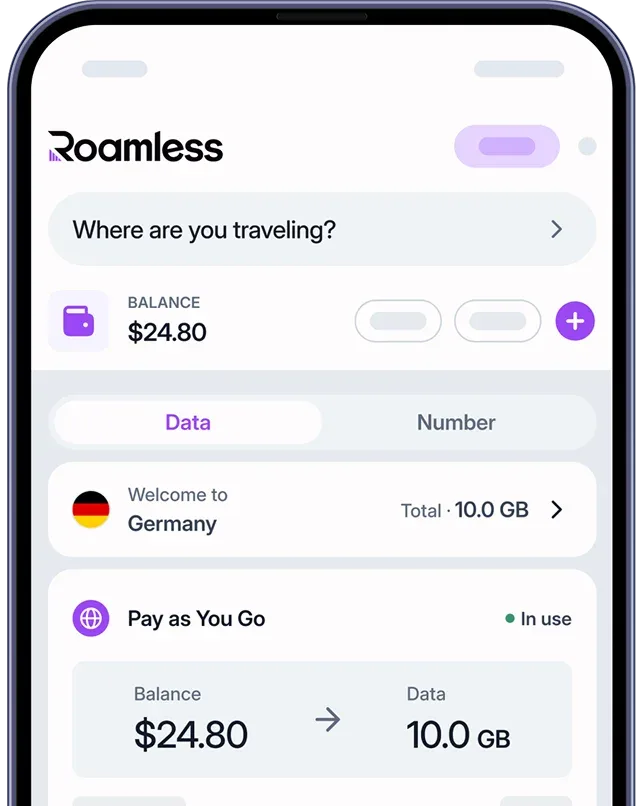
Monitor Data Usage: Keep track of data consumption directly through the Roamless app. This helps manage usage and prevents reaching data limits during the tournament.
Share Mobile Data: Use the hotspot functionality to share data between smartphones, tablets, and laptops if traveling with multiple devices.
Switch Networks if Needed: In areas with weak signals, manually switch to another available local network through the app settings to maintain stable connectivity.
For more information, you can read our post on the Best eSIM for the World Cup 2026.
Frequently Asked Questions
What destinations are covered by the Roamless North America regional plan?
The Roamless North America regional plan covers 5 destinations across the region, including the United States, Canada, Mexico, Puerto Rico, and the U.S. Virgin Islands.
How can I monitor mobile data usage during the World Cup 2026?
Data usage can be tracked directly in the Roamless app, which allows for monitoring consumption to prevent reaching data limits during the tournament.
How is the Roamless eSIM activated for the World Cup 2026 trip?
To activate the Roamless eSIM, simply scan the QR code or complete the activation through the Roamless app while connected to Wi-Fi before the trip. This ensures the eSIM is ready for use upon arrival at the destination.
Is hotspot sharing available with Roamless plans during the World Cup 2026?
Yes, all Roamless plans support unlimited hotspot usage without speed restrictions, allowing for the mobile data connection to be shared with other devices throughout the trip.